
Flight Operations

5.0 Flight Operations
American Virtual (AAVA) does not place undue pressure on its members. We recognize that individuals can only dedicate a limited amount of time to this hobby. To support continued participation while maintaining organizational activity levels, we have established reasonable minimum flight requirements that must be met in order to remain an active pilot.
Each pilot is required to complete a minimum of one flight every 30 days.
If you fail to meet this requirement, a system-generated warning will be sent to the email address on file. Once placed on termination warning, you will have fourteen (14) days to submit a flight report, which will be monitored by your Hub Manager. If no flight has been logged after forty-five (45) days, your account will be automatically retired. You will receive a system-generated email notification informing you of this change.
If you know in advance that you will be unable to meet the flight requirement, you must request a Leave of Absence (LOA) through your profile.
We want to work with our pilots to help them remain active; however, it is the pilot’s responsibility to maintain communication with hub management to determine the best path forward.
The submission of fraudulent PIREPs will result in the immediate termination of membership with AAVA.
5.1 Schedule
As our name suggests, American Virtual strives to mirror American Airlines flight operations as realistically as possible. This includes utilizing a real-world, current schedule of flights from American Airlines and its subsidiaries. For flight hours to count, pilots may only operate flights that are listed in the current AAVA schedule. The schedule can be accessed by selecting “Start a Flight” on the main Crew Center page or by choosing “Schedules” or “Live Schedules” from the left menu.
Each quarter, we update our database by pulling live flight information from FlightAware for American Airlines and its direct subsidiaries. While the schedules are accurate at the time they are obtained, they may lose accuracy depending on changes in real-world airline operations.
Using the Schedule Bid page in the Crew Center, you can search for flights that depart from your current location (the last airport where you landed) and add them to your bid list. Once you identify a flight, we strongly recommend selecting “Add to Bid” first to reserve the flight, then reviewing “Pilot Brief” to obtain accurate flight information and receive dispatch paperwork, closely mirroring real-world procedures. This briefing will provide specific details regarding your flight including route, fuel, departure time, maps, weather, and more.
American Virtual does not require you to fly your scheduled flight at the real-world departure time. You are free to complete the flight at any time of day or night based on your personal preference. However, American Virtual does keep track of your "On-Time" percentage. Regardless of the flight you book, ensure that your simulator time coincides with the time generated by SimBrief.
5.2 Jump Seat
To enhance the operation's realism, the system recognizes the last arrival and will only display flights from that airport. Pilots have the option of departing from the airport where they last arrived or purchasing a Jump Seat Ticket for a fee to move to another location.
Purchasing a Jump Seat Ticket allows pilots to leave their last arrived location and be able to bid on a flight leaving from a different airport. The employee rate for Jump Seat Tickets is $0.25/nautical mile, which will be automatically deducted from your earnings. The previous time to get to the new location was 1 second/nautical mile, with the launch of the new Crew Center, this is now instant.
Pilots will not be allowed to purchase a Jump Seat Ticket in the event they have not earned enough money although in our experience that is extremely unlikely.
If there are no flights available for the pilot's current rank at the arrival location, the pilot will be able to jump seat to a different location free of charge.
5.3 Livery Selection
As our name suggests, we strive to mirror the American Airlines flight operations in as realistic a manner as possible. This includes flying American Airlines branded aircraft (or one of the other Codeshare airlines currently in our schedule).
Pilots incur the risk of the flight report being rejected without warning if a report is found using a livery from an airline, not in our schedule, or one that does not correspond to the flight. There are many resources online as well as in our own downloads section to find and retrieve free American Airlines liveries (or subsidiaries and Codeshares), leaving truly little reason for an excuse.
5.4 Codeshares
American Airlines is a member of the oneworld alliance. We partially simulate this relationship through the inclusion of codeshare flights within our schedule. All flight numbers in the AAVA system will begin with AAL (American), CAR (American Cargo), HER (Heritage Schedule), or AAC (American Airlines Charters). However, decoding the flight number will allow you to determine which airline is actually operating the flight.
For your convenience, please refer to the table below:
| AALx-2xxx - Mainline American | AAL77xx - GOL (Gol Transportes Aereos) |
| AAL3xxx-5xxx - American Regional Carriers | AAL84xx - Japan Airlines |
| AAL6xxx - British Airways | AAL85xx - Air Nostrum |
| AAL72xx - Royal Jordanian | AAL87xx-88xx - Iberia |
| AAL73xx - Qantas | AAL89xx - Cathay Pacific |
| AAL75xx - Alaska Airlines | AAL9xxx - Finnair |
With that in mind, the table above is for reference only and there may always be schedule variations or different airline representations. For more information about any specific flight, we recommend checking either FlightAware or flightradar24. Schedules also change very rapidly, sometimes daily. If you happen to find a schedule that exists in the real world, but it is not present in our systems, please use the appropriate Discord channel.
Also, for programming convenience, we always use 9XXX numbers for our "Adventures" schedules.
5.5 Model Selection/Substitutions
All flights in our schedule specify which model is to be flown for the flight. While there are many resources online to download freeware aircraft, we will allow some substitutions to take place. For a model substitution to be valid, the substitution should be within the same family. For example:
- Flight calls for a Boeing 737-800 -- Valid substitutions in the 737 family would be (733, 34, 35, 36, etc.)
- Flight calls for Airbus 320 -- Valid substitutions in the A320 family would be (319, 320, 321)
Pilots run the risk of the flight report being rejected without warning if the model flown is outside the family of aircraft specified on the schedule. Examples could be:
- Flight schedule calls for a 737-800 -- Pilot uses a Boeing 767
- Flight schedule calls for an A319 -- Pilot uses a Boeing 737
For added convenience and easier understanding, please follow the substitution chart below:
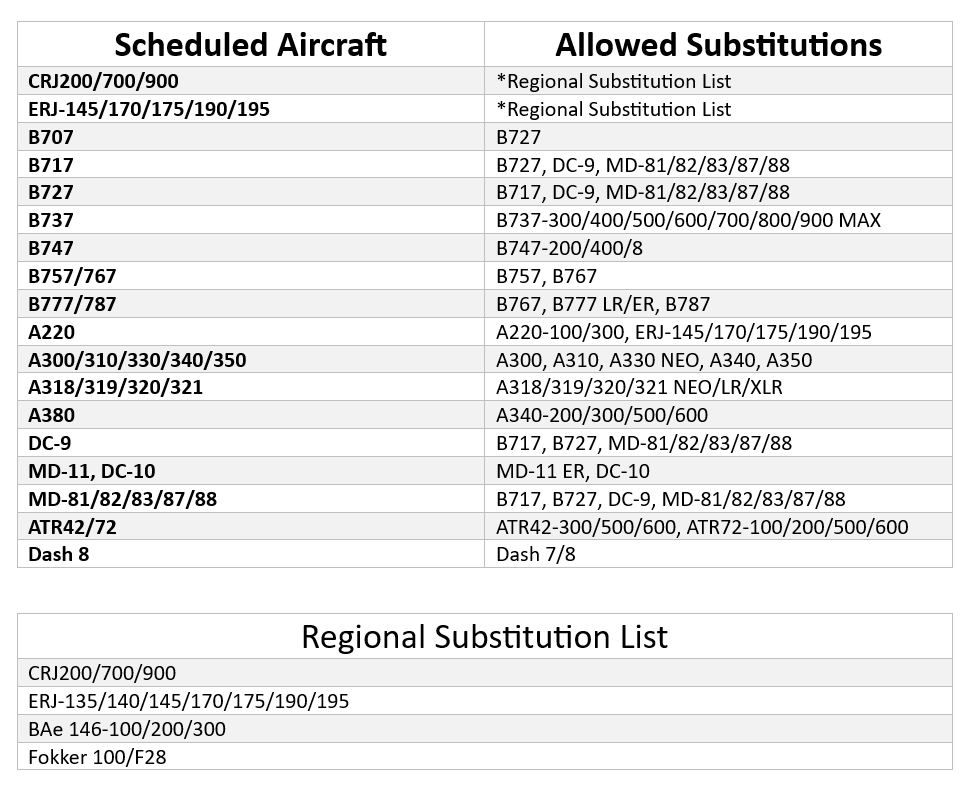
The Charter Operations module provides its separate fleet; however, the substitution table above applies all the same. Please follow the same chart when creating a Charter flight and choosing your equipment to complete it.
5.6 Flight Routing
AAVA does not allow direct-to-GPS routing. All pilots are required to follow a published flight plan for flight reports to be approved. For added convenience, and to add realism to the experience, we have integrated the SimBrief Dispatch Module into our briefing process. The module provides different sources to access flight plans or an entirely automatic routing for your flight. To access the feature, click on the "Briefing" link after pacing the bid on the flight you selected. The route you elect to fly must always be posted in SmartCARS3 or vmsACARS.
5.7 Flight Procedures
The following provisions apply to all flight operations within American Virtual:
-
Time acceleration is not permitted. All flights must be flown at 1x simulation speed, regardless of scheduled flight length.
-
All flights must depart from the published origin airport.
-
Pilots must adhere to proper FAA cruising altitude procedures. In the United States:
-
Eastbound IFR flights (heading 000–179 degrees) must cruise at an odd flight level in 2,000-foot increments beginning at FL190 (for example: FL190, FL210, FL230).
-
Westbound IFR flights (heading 180–359 degrees) must cruise at an even flight level in 2,000-foot increments beginning at FL180 (for example: FL180, FL200, FL220).
-
Air Traffic Control (ATC) may assign any flight level at any time based on traffic or operational requirements.
-
-
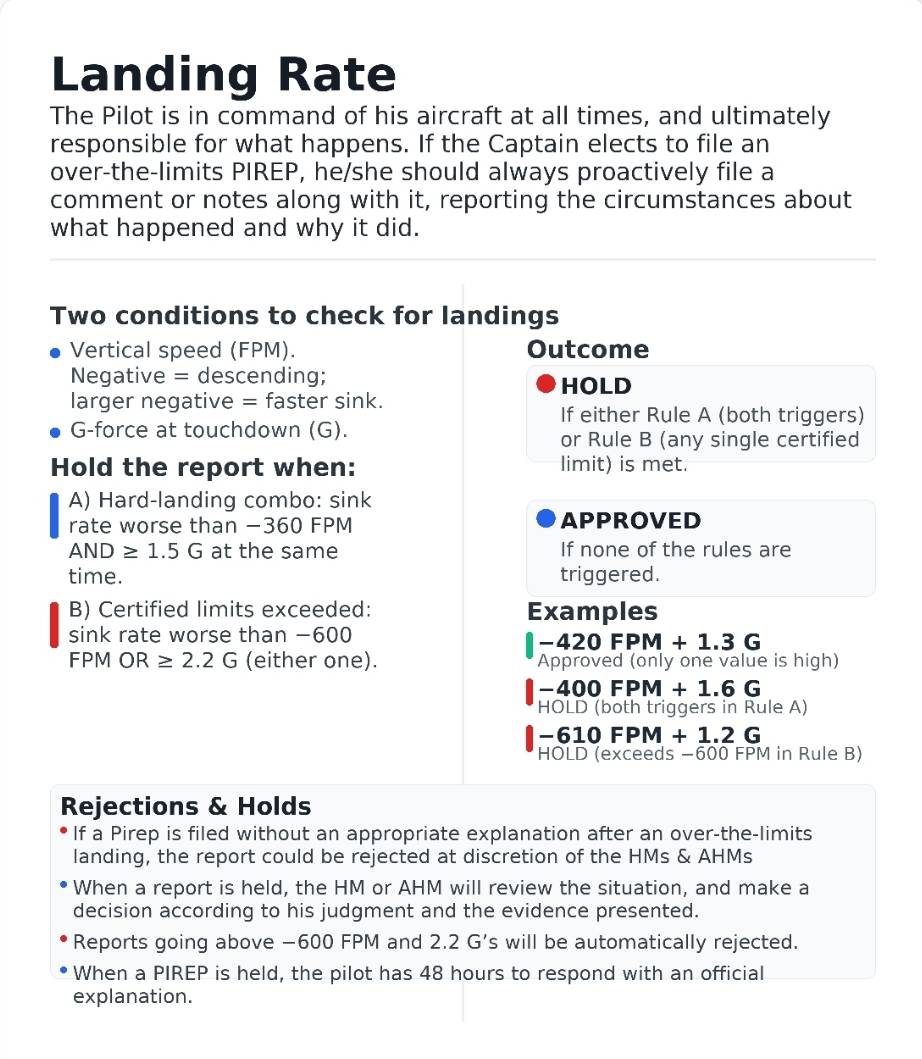
Landing performance standards
-
Flight reports with landing rates greater than -360 feet per minute (FPM) and 1.5 Gs will be rejected unless extraordinary circumstances are documented and explained in the comments.
-
Hub Managers and Assistant Hub Managers have the authority to approve or reject a PIREP based on their discretion and the information provided.
-
-
Maximum landing limits
-
Any landing that exceeds the maximum certified landing rate of -600 FPM or 2.2 Gs will not be approved.
Examples:
-
Landing rate -420 FPM and 1.3 Gs: approved
-
Landing rate -400 FPM and 1.6 Gs: held for review
-
Landing rate -610 FPM and 1.2 Gs: held for exceeding -600 FPM
-
-
Flight diversions due to weather or emergencies are permitted, although they are unlikely and will be evaluated on a case-by-case basis based on the information provided in the pilot report. Diversions must not be abused and should remain rare.
-
Unlimited fuel is never permitted. Pilots should follow OFP fuel recommendations and should aim to arrive at the destination with no less than 1,500 lbs. of fuel remaining in the tanks.
5.8 Breaks During Flight
AAVA defines a break as any simulator pause. Pilots are permitted to take a break(s) during flights and therefore are permitted to leave their computer during the break. The maximum length is 30 minutes. Only one break is authorized for flights of four hours or less. For flights exceeding four hours, breaks are at the discretion of the pilot after the fourth hour but never exceeding 30 minutes per break.
Pilots who fly online using VATSIM shall contact their ATC and request permission to vacate the flight deck before taking their break. If the controller does not grant permission, the pilot must wait for clearance to leave the cockpit from ATC.
Note: VATSIM also has a policy regarding being away from the computer during flight. Should a pilot be contacted by a VATSIM supervisor, and the pilot does not respond within 30 minutes, the pilot will be disconnected from their server and suspended for several days.
5.9 Online Flying
Although not required, every pilot is encouraged to join and fly with an online ATC network such as VATSIM or IVAO. Flying online with live ATC coverage will add a new dimension of realism to your experience at AAVA. With VATSIM, you will be working around other aircraft flown by real people from all over the world following a predefined set of rules extremely similar to the real world.
In addition, AAVA operates and participates in many events on VATSIM. For more information on VATSIM and online flying, consult the forums or contact a member of the corporate leadership team through one of the various communication channels provided.
Whenever you are flying online (and therefore representing AAVA), we require pilots to follow these set of guidelines:
- You will need to register for a free new pilot account if flying on VATSIM
- You must have an internet connection and a valid copy of FSX, P3D, X-Plane, FS2020, or FS2024
- To connect to VATSIM you will need to download the appropriate client software for your simulator. To do so just follow this link: VATSIM Clients
- To communicate with ATC via voice, you will need a working headset and microphone
- You must always professionally present yourself, recognizing that, when flying online, you are officially representing AAVA
- No foul, vulgar, or racially charged remarks will be tolerated on our platform or while operating on any online network (Compliance with the Code of Conduct is required on VATSIM as well). Any complaint received from anyone at VATSIM will be grounds for immediate termination.
- The flight prefix and call sign should be AAL followed by the number of the scheduled flight you have on your bid (i.e. AALXXXX). Your voice call sign is "American"
You do not need to be an aviation expert; However, it is important that:
- You are already familiar with your version of Flight Simulator
- You are comfortable and familiar with the aircraft you will use online
- You have a basic understanding of Air Traffic Control and have read the network manuals and documentation provided by VATSIM
- You can fly a SID/STAR properly and follow an IFR flight plan with airways and waypoints
5.9.1 Assistance to Pilots for Online Flying
Contrary to popular belief, online flying is not that difficult. It is meant to add another dimension to your flight simulator experience in terms of realism, but also in terms of your level of enjoyment. If you are still not comfortable flying online with ATC, the AAVA Discord is the best place to get assistance with VATSIM. AAVA is home to many pilots who regularly fly on VATSIM and are even controllers who are always ready to help.
Remember that the VATSIM community is very friendly and informative. Do not worry about making mistakes (because everyone does from time to time), sit at a busy airport for a while listening to the radios and immerse yourself in the ATC lingo and when you feel ready to join the action just remember to let the controller know that you are "kind of new to this" and they will assist you in every possible way.
5.10 Time Reporting
To maintain consistency with our timetable and route schedule, all reported departure and arrival times are listed and filed in the local time zone of the departing / arriving airport (e.g., If you depart an east coast airport at 7:00 am and arrive at a west coast airport at 8:00 am, your report times would be 07:00 departure and 08:00 arrival but will record your flight time as 4.0 hours).